 Team Bridge
Pictionary on Microsoft Teams
The easiest way to play Pictionary in a Teams meeting: paste a Scribble link in the meeting chat. Everyone draws and guesses in their browser while the call keeps running, and the game picks the words, runs the timer and keeps score. It’s free, and works the same on Zoom and Google Meet.
Scribble is free to play. Draw Battle, the team-vs-team version, is included with a TeamBridge pass.
Pictionary in a Teams call
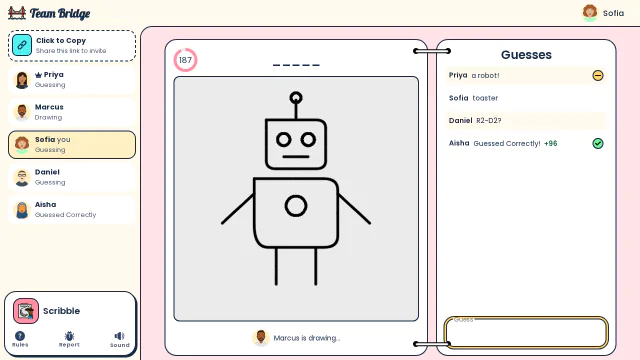
Scribble: Marcus draws a robot while the team’s guesses come in, one of them close 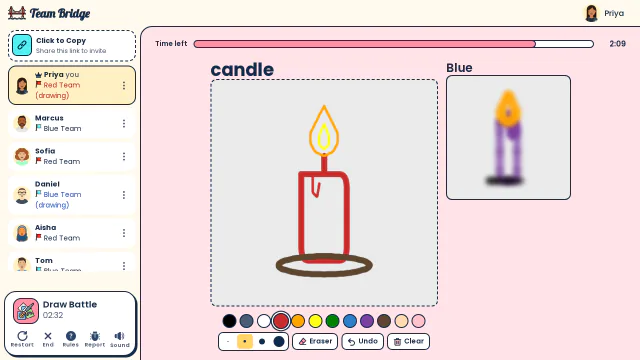
Draw Battle: Priya draws a candle for Red while Blue’s drawing of the same word shows blurred beside it 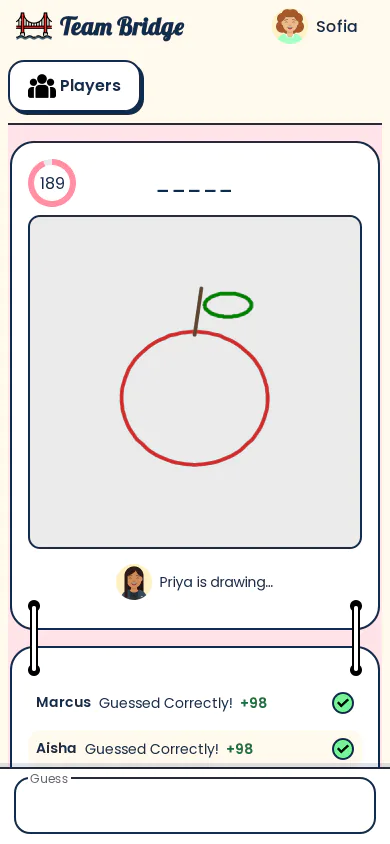
Scribble: Guessing on a phone: Priya draws an apple and Marcus and Aisha get it right


How to play Pictionary in a Teams meeting
- Step 1
Open a Scribble lobby
Click “Start a free Pictionary game”. Pick the word sets (Easy, Medium, Hard, Objects, People), the draw time and the number of rounds.
- Step 2
Paste the link in the meeting chat
Everyone opens it in a browser tab next to Teams, on a laptop or a phone, and picks a name. No Teams app to install, no account for players.
- Step 3
Draw, guess, laugh
Each player draws one of three words while everyone else types guesses. Faster guesses score more, and every drawing comes back at the end.
Microsoft Whiteboard or a Pictionary game?
You can play Pictionary on Teams with the Whiteboard in the meeting. It works, but the host does all the work.
| Whiteboard in a Teams meeting | Scribble on TeamBridge | |
|---|---|---|
| Words | The host thinks them up and sends each one privately to the drawer | Three to pick from each turn, from the word sets you chose |
| Drawing | One person draws on the shared whiteboard | The drawer draws on their own screen; everyone sees it live |
| Guessing | Out loud, so the loudest person wins | Typed, so quiet people play too, with letter hints as time runs out |
| Score and timer | Kept by hand | Automatic, with a podium at the end |
| Team vs team | Split the call yourself | Draw Battle: two teams draw the same word head to head |
Whiteboard from Microsoft’s public pages, October 2026.
Pictionary-style games for your team
Scribble
FreeClassic Pictionary: one draws, everyone guesses.
 3–100 players
 5–15 min
Draw Battle
PremiumTeam Pictionary: two teams draw the same word head to head.
4–200 players5–20 min
Fake Artist
FreeOne shared drawing and one faker who doesn’t know the word.
4–200 players5–20 min
Cosel
FreePictionary meets telephone: phrase, drawing, guess, repeat.
4–12 players10–20 min
Emoji Clues
PremiumPictionary with emoji: clue a phrase with emoji only.
3–25 players8–10 min
Color Clue
PremiumOne-word clues for a color on a board of 480 swatches.
3–30 players10–15 min
Tips for Pictionary at work
Start with Easy words
The first round is about getting everyone drawing. Add Medium and Hard for round two.
Keep it to 10–15 minutes
One or two rounds fit the end of a team meeting: Scribble takes 5 to 15 minutes.
Big call? Play team vs team
With 15 or more people, Draw Battle splits the call into two teams that draw the same word.
Holiday rounds
Add the Christmas word set in December and the Thanksgiving set in November.
Questions
Can you play Pictionary on Microsoft Teams?
Yes. Open a Scribble lobby on TeamBridge and paste the link in the Teams meeting chat. Everyone plays in the browser while the call keeps running; nobody has to share their screen.
Is there a free Pictionary for Microsoft Teams?
Scribble is free to play, with no Teams app to install, and players don’t need an account.
How many people can play?
Scribble takes 3 to 100 players in one lobby; Draw Battle and Fake Artist up to 200.
Can we play in teams, like the board game?
Yes: Draw Battle splits the group into two teams that draw the same word head to head. It’s included with a TeamBridge pass.
Does it work on Zoom and Google Meet too?
Yes. The game runs in a browser tab, so it works next to any video call app, and on phones.
Games to play on Microsoft TeamsA skribbl.io alternative for workTeam drawing games: a guide for hosts
Ready for your next team social?
Share one link. Everyone plays in the browser.
Games to play on Microsoft TeamsOffice party gamesIcebreaker games for meetingsA skribbl.io alternative for workA Gartic Phone alternative for workVirtual team triviaGames to play on Zoom with coworkersA Jackbox alternative for workA Kahoot alternative for team buildingFun Friday games for remote teamsA QuizBreaker alternative you play liveEnd of year team building gamesTeam building games for large groups