 Team Bridge
Virtual team trivia
Host a live trivia game in your next team meeting without writing a single question. Pick the categories and the difficulty, share one link, and everyone answers on their own screen with a leaderboard after every question.
Trivia is included with a TeamBridge pass. Codenames, Scribble and five other games are free to play.
Trivia night, in the middle of the work day
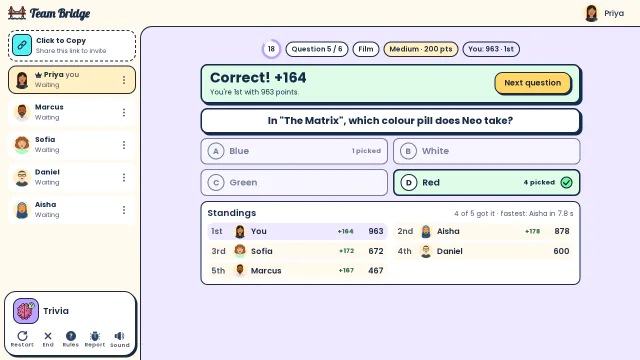
Trivia: The answer to “Which colour pill does Neo take?” is revealed: four of five got Red and Priya leads the standings with 963 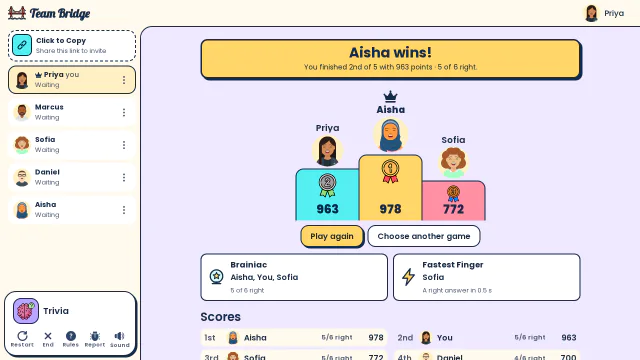
Trivia: Aisha wins by 15 points over Priya, with awards for Brainiac and Fastest Finger 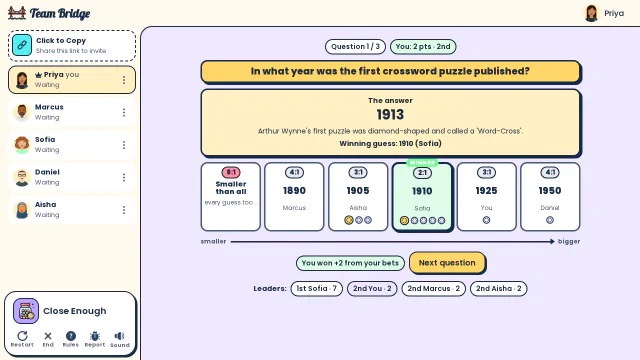
Close Enough: The answer is 1913: Sofia’s guess of 1910 wins the crossword question, and everyone who bet on her collects chips


A 15-minute trivia break
The format most teams settle on: short enough for a weekly meeting, long enough to crown a winner.
- 0–2 min
Join
Paste the lobby link in the meeting chat. People join on a laptop or phone while you say hello.
- 2–12 min
Trivia, 10 questions
Pick 3 or 4 categories and Medium difficulty. The faster a correct answer, the more points.
- 12–15 min
Crown the winner
The podium and awards (Brainiac, Fastest Finger) are on everyone’s screen. Post a screenshot in the team chat.
- +10 min
Got a longer slot?
Add Close Enough: guess a number, then bet on whose guess is closest. Nobody needs to know the answer to win.
Live trivia, a weekly quiz app or a presenter quiz?
There are three common ways to run trivia at work. They suit different teams.
| Weekly quiz apps (e.g. Water Cooler Trivia) | Presenter quizzes (e.g. Kahoot!) | TeamBridge Trivia | |
|---|---|---|---|
| When people play | On their own time during the week | Live, in a meeting | Live, in a meeting |
| Prep for the host | None: questions arrive by email or Slack | Write or pick a quiz, then share your screen | None: pick categories and share one link |
| What people see | Their own answers, results later | Questions on the shared screen, answers on their device | Questions, answers and the leaderboard on their own screen |
| After trivia | Wait for next week | Another quiz | 30 more team games: word, drawing and icebreakers |
From each product’s public pages, October 2026.
Trivia and quiz games for teams

Trivia
PremiumClassic multiple-choice trivia with a live leaderboard.
 2–100 players
 5–10 min
Close Enough
PremiumGuess the number, then bet on the closest guess.
2–40 players8–15 min
Four Groups
Premium16 words, 4 hidden groups: solve it together or race other teams.
2–50 players10–15 min
Five Clues
PremiumGuess the answer from up to 5 clues; fewer clues, more points.
2–50 players8–12 min
Emoji Clues
PremiumGuess the phrase from emoji, live.
3–25 players8–10 min
Bot or Not
PremiumA quiz about your team: which answer did the bot write?
3–20 players8–12 min
Trivia settings you can choose
Questions
From 1 to 50 per game; 10 questions fit a 10-minute slot.
Difficulty
Easy, Medium, Hard or Any, and multiple choice or true/false.
24 categories
General Knowledge, Film, Music, Television, Books, Science & Nature, Computers, Geography, History, Sports, Animals, Art and more, plus holiday trivia in December.
Group size
From 2 to 100 players, so the same game works for a team of six and an all-hands.
Questions
How do you do trivia on a virtual team call?
Open a Trivia lobby on TeamBridge, choose the categories and number of questions, and paste the link in the call chat. Everyone answers on their own device while you stay on video; scores update after every question.
Do I need to write my own questions?
No. Questions come from 24 categories at three difficulty levels. Pick a mix that fits your team.
How many people can play?
Trivia works from 2 to 100 players in one lobby. For a bigger event, split into breakout rooms with one lobby each.
Is virtual team trivia free?
Trivia is a premium game, included with a TeamBridge pass. Codenames, Scribble, Two Truths, One Lie and four other games are free to play.
Can we play holiday trivia?
Yes. Pick the holiday category in December for winter holiday questions; it pairs well with the holiday word packs in Scribble and Taboo.
How to run a 15-minute team trivia breakVirtual holiday party gamesHow to play Trivia
Games to play on Microsoft TeamsOffice party gamesIcebreaker games for meetingsA skribbl.io alternative for workA Gartic Phone alternative for workGames to play on Zoom with coworkersA Jackbox alternative for workPictionary on Microsoft TeamsA Kahoot alternative for team buildingFun Friday games for remote teamsA QuizBreaker alternative you play liveEnd of year team building gamesTeam building games for large groups