 Team Bridge
Microsoft Teams Games for Work is gone: what to play now
Microsoft’s free Games for Work app brought IceBreakers, Wordament, Minesweeper and Solitaire to Teams meetings. Microsoft retired it in May 2024. You don’t need a Teams app to play games in a meeting: paste one TeamBridge link in the meeting chat and everyone plays in the browser, next to the call.
Two Truths, One Lie, Scribble, Codenames and four more games are free. Premium games come with a TeamBridge pass: $299 for 7 days or $499 for 12 months.
Games in a Teams meeting today
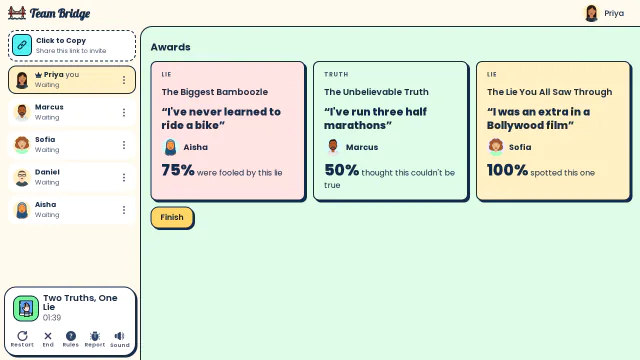
Two Truths, One Lie: The awards: Aisha’s “I’ve never learned to ride a bike” fooled 75% of the team, Marcus’s half marathons were the unbelievable truth 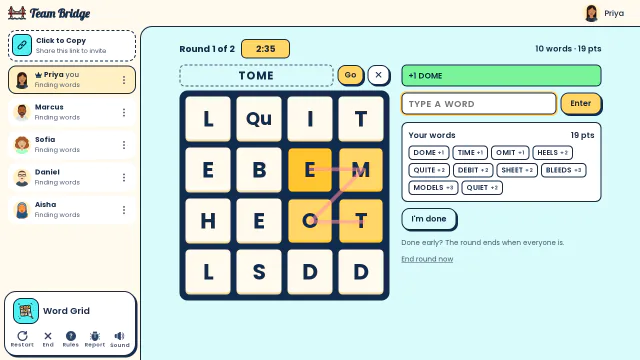
Word Grid: Priya drags across the letter grid to spell TOME, with ten words and 19 points already found this round 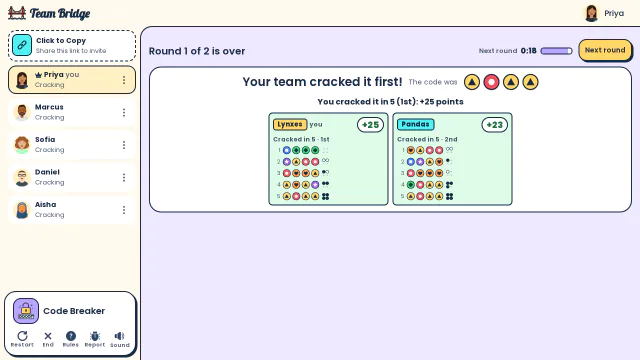
Code Breaker: Round 1 is over: the Lynxes crack the colour code in 5 guesses, just ahead of the Pandas


How to play games in a Teams meeting
No app to install and nothing for IT to approve. It takes about a minute.
- Step 1
Open a lobby
Pick a game on TeamBridge and click Start. You get a lobby with its own link.
- Step 2
Paste the link in the meeting chat
Everyone opens it in a browser tab, on a laptop or a phone, and picks a name. Guests from outside your company join the same way.
- Step 3
Play next to the call
Keep Teams running for the talking; the game runs in the browser and keeps score. Most games take 5 to 15 minutes.
What replaces each Games for Work game
Games for Work had four games. Here is the closest TeamBridge game for each, and how the two compare.
| Games for Work (retired) | TeamBridge | |
|---|---|---|
| Icebreakers | IceBreakers | Two Truths, One Lie (free), Who Said That? and This or That |
| Word game | Wordament: find words in a letter grid | Word Grid: race to find words in a grid of letter tiles |
| Logic puzzle | Minesweeper | Code Breaker: teams crack the same secret colour code |
| Quiet puzzle | Solitaire | Four Groups: 16 words, 4 hidden groups, solved together |
| How to start | Add the app in Teams (work and school accounts) | Paste one link in the meeting chat; nothing to install |
| Players | 2 to 250 | 2 to 200, depending on the game |
| Price | Free | 7 games free; the others with a $299 or $499 pass |
Games for Work details from Microsoft’s 365 blog: the November 2022 launch post, updated May 24, 2024 (“no longer available”); checked October 2026.
6 games to play in a Teams meeting today

The classic icebreaker: three statements, one lie.
 4–20 players
 5–10 min
Word Grid
PremiumA word search race in a grid of letter tiles, like Wordament.
2–30 players5–12 min
Code Breaker
PremiumTeams race to crack the same secret colour code.
2–100 players10–20 min
Scribble
FreeDraw-and-guess everyone knows.
3–100 players5–15 min
Trivia
PremiumLive trivia in 24 categories, for up to 100 players.
2–100 players5–10 min
Codenames
FreeTwo teams, one grid of words.
4–10 players5–15 min
Other ways to play in Teams
Quiz apps with a Teams app
Water Cooler Trivia has a Teams app for a weekly quiz, and Kahoot! a host flow for live quizzes. Good fits for a quiz ritual or questions you write yourself.
Free browser games
skribbl.io and Gartic Phone also run in a tab next to the call. They are public, ad-supported games made for friends.
Hosted events
Hosted parties such as Confetti’s are run by a host on Zoom, not in Teams.
TeamBridge
Drawing, word, trivia and party games made for work, from one link, for 2 to 200 players.
Tips for games in a Teams meeting
Cameras on
The reactions are half the fun. Keep the call on gallery view while people play in the browser.
Phones work
People can stay in Teams on their laptop and play on their phone from the same link.
Sharing your screen is optional
Everyone sees the game on their own device. Some hosts share the lobby while people join.
Make it a habit
Ten minutes at the end of the weekly meeting beats a big event once a quarter. Rotate the game each week.
Questions
What happened to Games for Work in Microsoft Teams?
Microsoft retired it: its blog post about the app was updated on May 24, 2024 to say the Games for Work pilot app for Teams is no longer available. It had IceBreakers, Wordament, Minesweeper and Solitaire.
Can you still play games in a Teams meeting?
Yes. Browser games like TeamBridge work in any Teams meeting: paste a lobby link in the meeting chat and everyone plays in a tab next to the call.
Do we need IT to approve an app?
No. TeamBridge is a website, not a Teams app, so there is nothing to install or approve. Players don’t need an account.
Can guests from outside our company play?
Yes. Anyone with the link can join from a browser, whatever Teams tenant they are in.
How many people can play?
It depends on the game: Codenames is best for 4 to 10, Trivia takes up to 100 and Draw Battle up to 200. Each card shows the range.
Is it free?
Two Truths, One Lie, Scribble, Codenames and four more games are free. The others come with a TeamBridge pass: $299 for 7 days or $499 for 12 months, for up to 200 players.
Games to play on Microsoft TeamsPictionary on Microsoft TeamsShare this list in Teams
Ready for your next team social?
Share one link. Everyone plays in the browser.
Games to play on Microsoft TeamsOffice party gamesIcebreaker games for meetingsA skribbl.io alternative for workA Gartic Phone alternative for workVirtual team triviaGames to play on Zoom with coworkersA Jackbox alternative for workPictionary on Microsoft TeamsA Kahoot alternative for team buildingFun Friday games for remote teamsA QuizBreaker alternative you play liveEnd of year team building gamesTeam building games for large groupsA Confetti alternative you host yourselfA Water Cooler Trivia alternative, played liveCompare team building options