 Team Bridge
What’s a good 10-minute activity to kick off a virtual all-hands for 50 people?
Play two short games where all 50 answer at once on their own screen: This or That votes while people join, then five Trivia questions with a leaderboard, from one TeamBridge link pasted in the Zoom, Teams or Meet chat. Both take up to 100 players in one room and fit 10 minutes; Type Racer is a free closer for up to 200, and This or That and Trivia come with one TeamBridge pass for the company.
Type Racer, Fake Artist and the other free games cost nothing. This or That, Trivia, People Bingo and the other premium games come with one pass.
Updated
What 50 people see
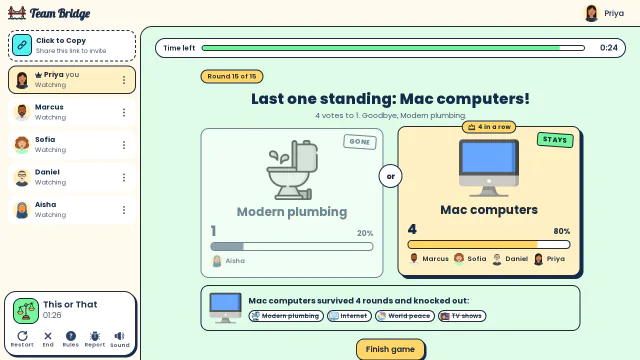
This or That: Last one standing: Mac computers survive four rounds, knocking out TV shows, World peace, the Internet and Modern plumbing 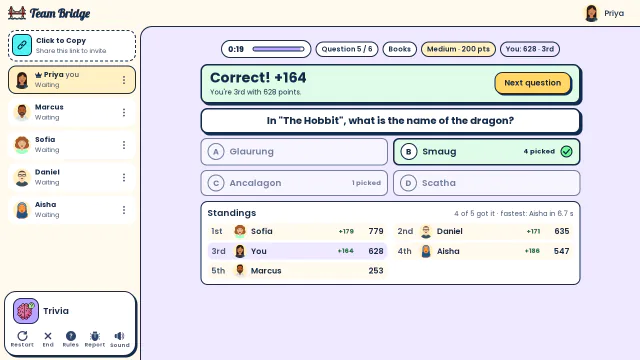
Trivia: The reveal for “In The Hobbit, what is the name of the dragon?”: four of five picked Smaug, and Sofia leads the standings 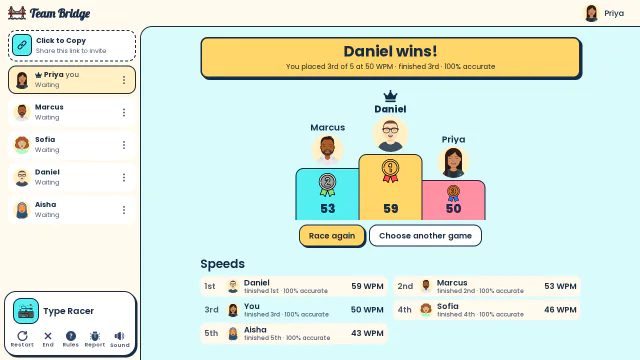
Type Racer: Results: Daniel wins at 59 WPM, ahead of Marcus at 53 and Priya at 50


A 30-minute all-hands: a 10-minute kickoff, the agenda and a race to close
For 30 to 100 people in one room. The games take the first 10 minutes and the last 2; the agenda keeps the middle.
- 0–5 min
Join and vote: This or That
Post the game link in the meeting chat as the call opens. Everyone votes on two options per round while the last people join.
- 5–10 min
Five questions: Trivia
Set the room to 5 questions and pick a category like General Knowledge. A leaderboard after each question.
- 10–28 min
The agenda
The speakers take over. The room stays open, so nobody needs a new link for the close.
- 28–30 min
Close: Type Racer
One one-minute typing race for the whole company, then the host reads the winner.
Games to open an all-hands

This or That
PremiumVote on two options each round, up to 100 players.
 2–100 players
 5–10 min

Trivia
PremiumA live quiz with a leaderboard, up to 100 players.
2–100 players5–10 min
Type Racer
FreeA one-minute typing race for up to 200.
2–200 players1–5 min
People Bingo
PremiumFind the colleague who…: bingo for up to 100.
3–100 players8–12 min
Fake Artist
FreeOne drawing, one faker: up to 200 players in one room.
4–200 players5–20 min
How to run it in a big Zoom, Teams or Meet call
1. Name a game host
Not the speaker: someone who starts each game and answers “where’s the link?” in the chat.
2. Open the room before the all-hands
Sign in on teambridge.app, start This or That and copy the game link.
3. Post the game link in the chat, twice
Once as the call opens and once before the close, for the people who join late. Everyone plays in a browser tab.
4. Share the standings, not the game
Everyone plays on their own screen; the host shares only the leaderboard.
What it costs
One pass covers the whole company in the rooms you host, not per person.
The free games
Scribble, Fake Artist, Spy Words, Two Truths, One Lie and Type Racer are among the free games. You can start 5 free games for the group, whoever hosts, and 1 more 6 days after the last one. Type Racer and Fake Artist take up to 200 players and are free.
Premium games
The other games come with one TeamBridge pass for the whole team, not per person; see the pricing page for today’s prices.
Only the host pays
Players join from the link with a name, no account and no card.
Why these games fit 50 people in 10 minutes
Everyone answers at once
Nobody waits for a turn: This or That (2 to 100 players) and Trivia (2 to 100) take the whole call in one room.
Short on purpose
This or That fills the minutes while people join, and five Trivia questions take about five more.
Swaps
People Bingo (3 to 100 players) to learn who’s who; Fake Artist (4 to 200) is free; Draw Battle (4 to 200) puts one side of the company against the other.
Over 100 people
Open one room per department for the 100-player games; Type Racer takes 2 to 200 in one room.
Questions
What’s a good 10-minute activity to kick off a virtual all-hands for 50 people?
Two games where all 50 answer at once: This or That while people join, then five Trivia questions with a leaderboard. Paste one TeamBridge link in the Zoom, Teams or Meet chat; both take up to 100 players in one room.
Can 50 people play at once?
Yes. This or That, Trivia and People Bingo take up to 100 players in one room; Type Racer and Fake Artist up to 200.
How do we keep it to 10 minutes?
Start This or That as the call opens, then set Trivia to 5 questions. The game runs the timer and the scores, so the host only clicks start.
Does it work on Zoom, Teams and Google Meet?
Yes. Paste the game link in the meeting chat; everyone plays in a browser tab next to the call, with nothing to install.
Do guests need an account or a download?
No. The host signs in and shares the link; everyone else picks a name and plays in the browser, on a laptop or a phone.
How much does it cost?
The free games cost nothing: 5 free games for the group, whoever hosts, and 1 more 6 days after the last one. The premium games come with one TeamBridge pass for the whole team, not per person; only the host pays. The pricing page has today’s prices.
Icebreakers for large groupsTeam building games for large groupsVirtual team trivia
Games to play on Microsoft TeamsOffice party gamesTeam building games for workIcebreaker games for meetingsA skribbl.io alternative for workA Gartic Phone alternative for workVirtual team triviaGames to play on Zoom with coworkersA Jackbox alternative for workPictionary on Microsoft TeamsA Kahoot alternative for team buildingFun Friday games for remote teamsA QuizBreaker alternative you play liveEnd of year team building gamesTeam building games for large groupsHoliday party games for large groupsIcebreakers for large groupsIcebreaker questions for workThis or that questions for workTeam building activities for workEmployee engagement ideasNew hire welcome gamesA virtual Family Feud-style game for workA Scattergories alternative for workA Mafia and Werewolf-style game for workA Connections-style game for work teamsA Name That Tune-style game for workA Wavelength-style game for workA Boggle-style word game for workA game like Among Us for workHoliday trivia for workChristmas Pictionary onlineHoliday icebreakers for workChristmas awards for workVirtual holiday bingo for workChristmas music quiz for workA Confetti alternative you host yourselfA Games for Work replacement for TeamsA Water Cooler Trivia alternative, played liveCompare team building options