 Team Bridge
A Name That Tune-style game for work
Melody Match is a guess-the-tune game for a team call. A built-in music box plays a famous melody a few notes at a time, in everyone’s browser at the same moment, and the team races to type the title. Nobody has to share audio over Teams or Zoom, and there’s no playlist to make.
Melody Match comes with a TeamBridge pass for the whole team. Nine games are free to play, like Type Racer and Starts With J.
Updated
A music quiz over the call, or Melody Match
| Song clips over screen share | TeamBridge Melody Match | |
|---|---|---|
| Setup | The host makes a playlist and cuts the clips | None: tunes come in packs |
| Sound | Shared from the host’s computer through the call | Played in each player’s browser at the same moment |
| Answers | Shouted out or typed in the chat; the host keeps score | Typed in the game; spelling doesn’t need to be perfect; points for speed |
| The tunes | Any song the host picks | Classical hits, nursery rhymes and folk, and a holiday pack |
| Price | Free, plus the host’s time | 9 games free (5 free games for the group, whoever hosts, and 1 more 6 days after the last one); Melody Match comes with a pass |
Name That Tune is an American TV music game show where contestants identify songs played by a band (Wikipedia, November 2026).
Melody Match in action
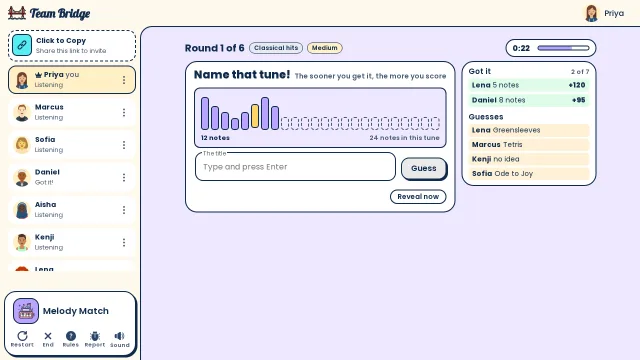
Melody Match: Twelve notes into a classical tune: Lena named it after 5 notes and Daniel after 8, while “Greensleeves” and “Ode to Joy” are wrong guesses 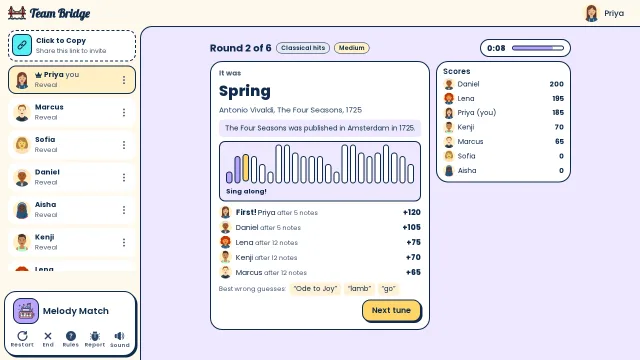
Melody Match: The reveal: it was Vivaldi’s “Spring”. Priya got it first after 5 notes, and the sing-along plays the whole phrase 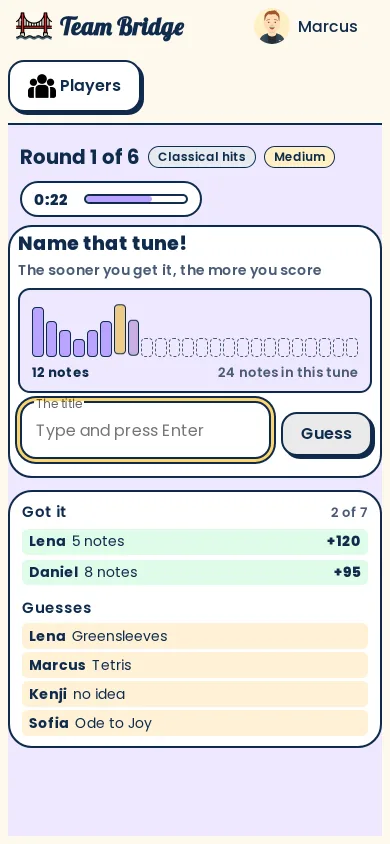
Melody Match: Playing on a phone: the note row lights up as the tune plays, with who got it and the wrong guesses below


How a round goes
- Step 1
Listen
The music box plays the first 3 notes, then 5, 8, 12, then the whole phrase. Everyone hears the same note at the same moment.
- Step 2
Type the title
The sooner you get it, the more you score, with a bonus for the first three. Wrong guesses show up for everyone.
- Step 3
Finish the lyric
Every few rounds, a line with its last words missing while the tune plays. Then the reveal plays the whole tune: sing along.
Music and quiz games for your team

Melody Match
PremiumName That Tune style: a melody a few notes at a time; race to name it.
 3–25 players
 8–12 min

Trivia
PremiumA live quiz with 24 categories and a leaderboard after every question.
2–100 players5–10 min
Type Racer
FreeEveryone types the same passage at the same time.
2–200 players1–5 min
Close Enough
PremiumGuess the number, then bet on whose guess is closest.
2–40 players8–15 min
Emoji Clues
FreeOne player clues a phrase with emoji only, live.
3–25 players8–10 min
Team Awards
PremiumSuperlatives the team votes on, a warm way to close.
3–50 players8–12 min
Tips for a music round at work
Unmute the browser, not the call
Each player taps once to let their browser play sound. The call can stay muted while the tune plays.
December? Add the holiday pack
Carols and holiday songs join the mix by themselves from December 1 to January 6, or any time in Options.
Keep it to 10 minutes
A game takes 8 to 12 minutes, a good fit for the start of a party or a Friday social.
Up to 25 players
For a bigger call, open two lobbies, or play Trivia, which takes up to 100.
Questions
How do you play Name That Tune on a work call?
Open a Melody Match lobby and paste the link in the Teams, Zoom or Meet chat. The tune plays in each browser, so nobody has to share their computer’s sound, and the game keeps the score.
Which songs does it play?
Famous melodies from three packs: classical hits, nursery rhymes and folk, and holiday songs and carols. They’re played on a built-in music box, not recordings, and none repeat until a pack is used up.
How many people can play?
From 3 to 25 in one lobby; a game takes about 8 to 12 minutes.
Is it free?
Melody Match comes with a TeamBridge pass. Nine games are free to play, like Type Racer and Starts With J.
Do players need an account?
No. The host signs in and shares the link; everyone else picks a name and plays on a laptop or phone.
Is TeamBridge connected to the Name That Tune show?
No. Melody Match is our own game; Name That Tune is named here only to describe the style of game.
Virtual team triviaChristmas games for teamsHow to play Melody Match
Ready for your next team social?
Share one link. Everyone plays in the browser.
Games to play on Microsoft TeamsOffice party gamesTeam building games for workIcebreaker games for meetingsA skribbl.io alternative for workA Gartic Phone alternative for workVirtual team triviaGames to play on Zoom with coworkersA Jackbox alternative for workPictionary on Microsoft TeamsA Kahoot alternative for team buildingFun Friday games for remote teamsA QuizBreaker alternative you play liveEnd of year team building gamesTeam building games for large groupsHoliday party games for large groupsIcebreakers for large groupsIcebreaker questions for workThis or that questions for workTeam building activities for workEmployee engagement ideasNew hire welcome gamesA virtual Family Feud-style game for workA Scattergories alternative for workA Mafia and Werewolf-style game for workA Connections-style game for work teamsA Wavelength-style game for workA Boggle-style word game for workA game like Among Us for workHoliday trivia for workChristmas Pictionary onlineHoliday icebreakers for workChristmas awards for workVirtual holiday bingo for workChristmas music quiz for workA Confetti alternative you host yourselfA Games for Work replacement for TeamsA Water Cooler Trivia alternative, played liveCompare team building options
Name That Tune is a trademark of its owner. TeamBridge isn’t affiliated with or endorsed by them.