 Team Bridge
A virtual Family Feud-style game for work
Top Answers is a survey game in the Family Feud style, made for a team call. Everyone answers the same prompt first, the room’s most popular answers go on a hidden board, and two teams take turns guessing them, with strikes and a steal. There are no slides to build: share one link in Teams, Zoom or Meet and the game runs the board, the timer and the score.
Top Answers comes with a TeamBridge pass for the whole team. Nine games are free to play, like Starts With J and Fake Artist. Players join from the link without an account.
Updated
A Family Feud board you build, or one your team fills
| A do-it-yourself Family Feud | TeamBridge Top Answers | |
|---|---|---|
| The survey | Answers you collect or copy before the call | Your team answers live, so the board is about your team |
| Setup | A slides or spreadsheet board you fill in and flip by hand | None: pick the rounds and share one link |
| Players | Two teams; the host runs the board | 3 to 100 players, in two teams from 6 |
| On a Teams or Zoom call | The host shares their screen | Everyone plays on their own screen; no screen sharing |
| Price | Free, plus the host’s time | 9 games free (5 free games for the group, whoever hosts, and 1 more 6 days after the last one); Top Answers comes with a pass |
Family Feud is an American TV game show where two families name the most popular answers to survey questions (Wikipedia, November 2026).
Top Answers on a team call
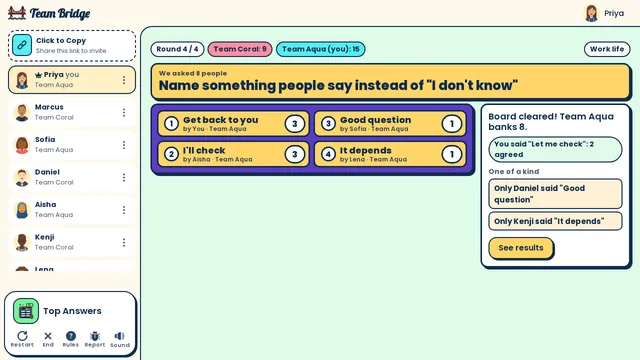
Top Answers: The reveal for “Name something people say instead of ‘I don’t know’”: Team Aqua clears the board (Get back to you 3, I’ll check 3) and banks 8 points 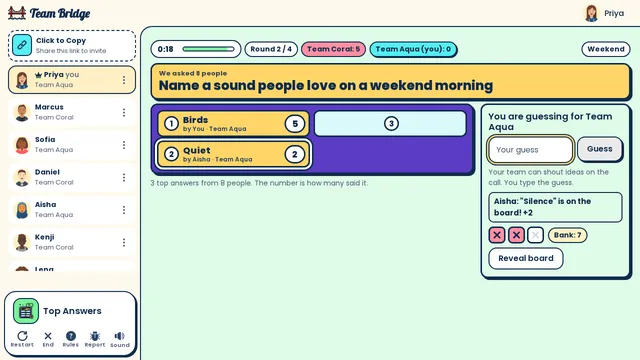
Top Answers: Team Aqua guesses a sound 8 people love on a weekend morning: Birds (5) and Quiet (2) are flipped, two strikes, one card to go 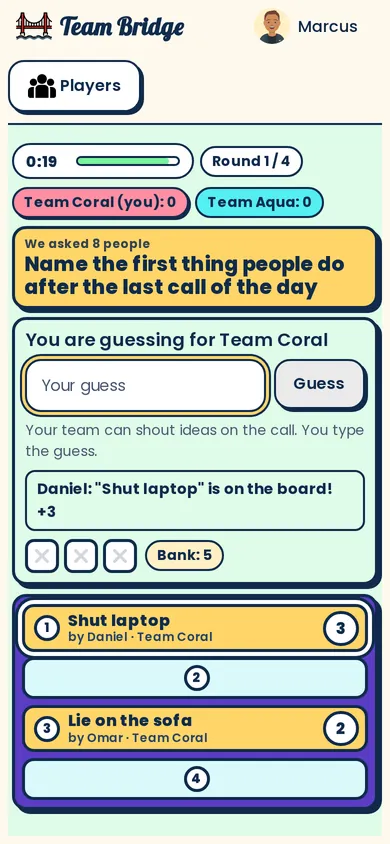
Top Answers: Playing on a phone: your turn to guess, the strikes, the bank and the board


How a round goes
- Step 1
Survey the room
Everyone types a short answer to the same prompt, like “Name something people do on a Friday afternoon at work”. Nobody sees the others’ answers.
- Step 2
Guess the top answers
The most popular answers go on a hidden board. One guesser at a time; three strikes and the other team can steal the round.
- Step 3
The reveal
Every card flips, and the lone answers get their moment: “Only Sam said interpretive dance.”
Game show games for your team
Top Answers
PremiumFamily Feud style: your team answers, then guesses the top answers.
 3–100 players
 10–15 min

Trivia
PremiumA live quiz with 24 categories and a leaderboard after every question.
2–100 players5–10 min
Think Alike
PremiumAnswer the way you think everyone else will: the most common answer wins.
3–50 players8–16 min
Close Enough
PremiumGuess the number, then bet on whose guess is closest.
2–40 players8–15 min
Starts With J
FreeName a thing in each category that starts with the letter.
2–24 players5–10 min
Team Awards
PremiumSuperlatives the team votes on, a warm way to close.
3–50 players8–12 min
Why it works better at work than a slides board
The board is about your team
The answers come from the people on the call, not a survey of strangers, so the guessing is about your colleagues.
Nothing to prepare
The prompts come in packs, and the host can add up to 10 of their own, like “Name a word that sums up this quarter”.
Big calls work
Top Answers takes up to 100 players. With 6 or more it splits the call into two teams; under 6 it’s everyone for themselves.
The quiet people play too
The guesser rotates, so everyone has a go, and teammates can help out loud.
Questions
How do you play Family Feud virtually at work?
Open a Top Answers lobby and paste the link in the Teams, Zoom or Meet chat. Everyone answers the prompt on their own screen, then the game builds the board from your team’s answers and runs the guessing, the strikes and the score.
Is there a free virtual Family Feud for work?
A slides template is free but takes an evening to build and runs by hand. Top Answers comes with a TeamBridge pass; seven other games, like Starts With J and Fake Artist, are free to play.
Can we use our own questions?
Yes. The host can type up to 10 prompts in the settings, like “Name something you’d find on Priya’s desk?”. They play first, then the packs fill the other rounds.
How many people can play?
From 3 to 100 in one lobby. With 6 or more players you play in two teams; a game is 5 rounds by default (3 to 10), about 10 to 15 minutes.
Does it work on Microsoft Teams?
Yes. Paste the link in the meeting chat; the game runs in a browser tab next to the call, so nobody has to share a screen. Zoom, Google Meet and Webex work the same way.
Is TeamBridge connected to the Family Feud show?
No. Top Answers is our own game; Family Feud is named here only to describe the style of game.
Virtual team triviaHoliday party games for large groupsHow to play Top Answers
Ready for your next team social?
Share one link. Everyone plays in the browser.
Games to play on Microsoft TeamsOffice party gamesTeam building games for workIcebreaker games for meetingsA skribbl.io alternative for workA Gartic Phone alternative for workVirtual team triviaGames to play on Zoom with coworkersA Jackbox alternative for workPictionary on Microsoft TeamsA Kahoot alternative for team buildingFun Friday games for remote teamsA QuizBreaker alternative you play liveEnd of year team building gamesTeam building games for large groupsHoliday party games for large groupsIcebreakers for large groupsIcebreaker questions for workThis or that questions for workTeam building activities for workEmployee engagement ideasNew hire welcome gamesA Scattergories alternative for workA Mafia and Werewolf-style game for workA Connections-style game for work teamsA Name That Tune-style game for workA Wavelength-style game for workA Boggle-style word game for workA game like Among Us for workHoliday trivia for workChristmas Pictionary onlineHoliday icebreakers for workChristmas awards for workVirtual holiday bingo for workChristmas music quiz for workA Confetti alternative you host yourselfA Games for Work replacement for TeamsA Water Cooler Trivia alternative, played liveCompare team building options
Family Feud is a trademark of its owner. TeamBridge isn’t affiliated with or endorsed by them.