 Team Bridge
What games can we play at a virtual new year team kickoff on Zoom or Teams?
Open the call with This or That, catch up with Who Said That? using your own new year prompts and collect the team’s ideas for the year with Top Answers, all from one TeamBridge link pasted in the Zoom or Teams chat, with nothing to install. Two Truths, One Lie and Type Racer are free, and the other three come with one TeamBridge pass for the whole team, not per person.
Two Truths, One Lie, Type Racer and the other free games cost nothing. This or That, Who Said That?, Top Answers and the other premium games come with one pass for the team.
Updated
What the kickoff looks like on everyone’s screen
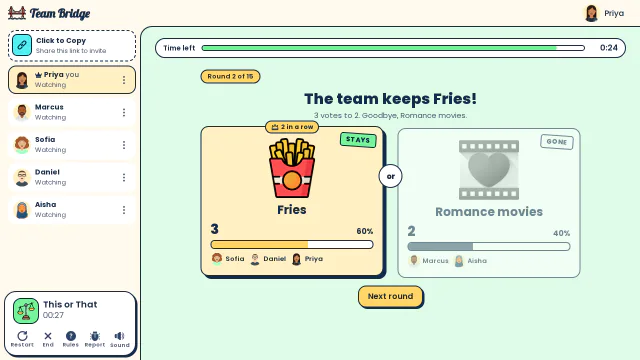
This or That: A split vote: the team keeps Fries 3 to 2, so Romance movies vanishes despite Marcus and Aisha 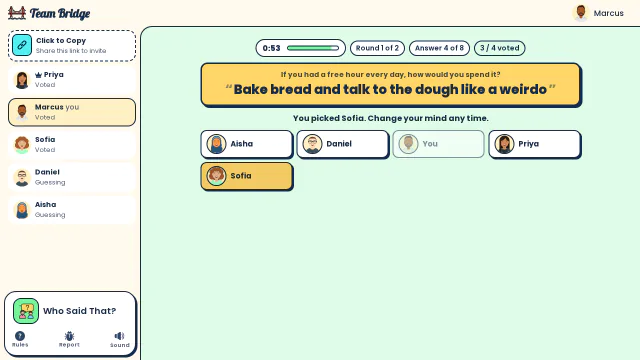
Who Said That?: Marcus guesses who wrote “Bake bread and talk to the dough like a weirdo” while the team votes 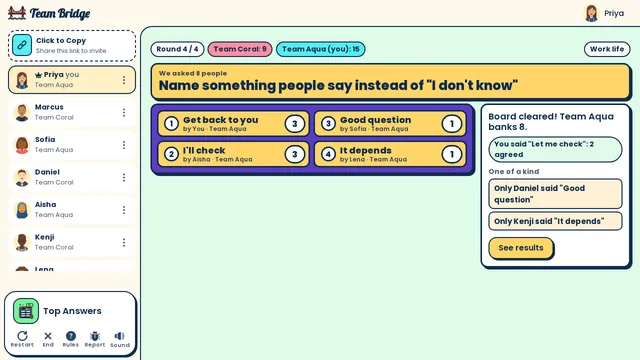
Top Answers: The reveal for “Name something people say instead of ‘I don’t know’”: Team Aqua clears the board (Get back to you 3, I’ll check 3) and banks 8 points


A 45-minute new year kickoff on Zoom or Teams
One room for the whole call, for 5 to 30 people. Every step is a game, so nobody has to present.
- 0–5 min
Warm up: This or That
Paste the game link in the meeting chat. Everyone votes on two options per round while the last people join.
- 5–15 min
Catch up: Who Said That?
Type your own prompts, like “What’s one thing you want to learn this year?”. Everyone answers anonymously, then guesses who wrote what.
- 15–22 min
Meet the new joiners: Two Truths, One Lie
Everyone writes two truths and one lie, the new joiners included, and the team votes for the lie.
- 22–34 min
Look ahead: Top Answers
Type a prompt like “Name one thing our team should start doing this quarter?”. Everyone answers, then two teams guess the most common answers.
- 34–40 min
Race: Type Racer
Two or three one-minute typing races for everyone.
- 40–45 min
Close
Read the top answers from the board, pick one to try this quarter and book the next team game.
Games for a new year kickoff

This or That
PremiumTwo options per round and the whole team votes: a warm-up with nothing to prepare.
 2–100 players
 5–10 min

Who Said That?
PremiumAnonymous answers to your own prompts, then guess who wrote each one.
3–30 players8–15 min
Top Answers
PremiumYour own prompts about the year ahead, then two teams guess the top answers.
3–100 players10–15 min
Two truths and one lie: meet the new joiners.
4–20 players5–10 min
Type Racer
FreeA one-minute typing race to end the kickoff.
2–200 players1–5 min
How to run it on Zoom or Teams
1. Book a normal Zoom or Teams meeting
A 45-minute slot in work hours. Nothing to install in Zoom or Teams: no app, no admin approval.
2. Open a room a few minutes early
Sign in on teambridge.app, start the first game and copy the game link.
3. Paste the game link in the Zoom or Teams chat
Everyone opens it in a browser tab next to the call, on a laptop or a phone, and types a name. Guests don’t need an account.
4. Keep the call for talking
Everyone sees the game on their own screen, so nobody needs to share a screen. Share yours only for the final standings.
5. Start the next game from the same room
Everyone stays in the room between games, so you never send a second link.
What it costs
Nothing to install in Zoom or Teams and nothing per person.
The free games
Scribble, Fake Artist, Spy Words, Two Truths, One Lie and Type Racer are among the free games. You can start 5 free games for the group, whoever hosts, and 1 more 6 days after the last one. A kickoff on Two Truths, One Lie and Type Racer alone fits too.
Premium games
The other games come with one TeamBridge pass for the whole team, not per person; see the pricing page for today’s prices.
Only the host pays
Players join from the link with a name, no account and no card.
Kickoff prompts to type in
Paste them as your own prompts in Who Said That? or Top Answers (each ends with a question mark).
Catching up
What was the best thing you ate over the break? · What’s a small habit you’re trying this year? · Where would you go if you had a free week this spring?
Looking ahead
What should our team start doing this quarter? · What should we stop doing? · What’s one thing you want to learn this year?
No resolutions needed
Nobody has to share a resolution. Questions about small things keep it easy for everyone.
For a bigger kickoff
A department of 30 to 100
This or That (2 to 100 players), Top Answers (3 to 100) and Trivia (2 to 100) take everyone in one room. Who Said That? takes 3 to 30, so swap it for People Bingo (3 to 100).
Several teams on one call
Open one room per team and post each game link in its breakout room, then compare the winners at the end.
Questions
What games can we play at a virtual new year team kickoff on Zoom or Teams?
This or That to warm up, Who Said That? with your own new year prompts, Two Truths, One Lie to meet new joiners and Top Answers to collect ideas for the year. Paste one TeamBridge link in the Zoom or Teams chat; everyone plays in a browser tab next to the call.
How long should a new year kickoff game session be?
45 minutes fits the whole plan. With 30 minutes, play This or That, Who Said That? and Top Answers; with 15, one Who Said That? round.
What questions can we ask at a new year kickoff?
Light ones anyone can answer in a sentence: “What’s one thing you want to learn this year?”, “What should our team start doing this quarter?”, “What was the best thing you ate over the break?”.
Do we need a Zoom or Teams app?
No. The games run on teambridge.app in a browser tab; the call app is only where you talk and paste the link.
Do guests need an account or a download?
No. The host signs in and shares the link; everyone else picks a name and plays in the browser, on a laptop or a phone.
How much does it cost?
The free games cost nothing: 5 free games for the group, whoever hosts, and 1 more 6 days after the last one. The premium games come with one TeamBridge pass for the whole team, not per person; only the host pays. The pricing page has today’s prices.
Team building games for workIcebreaker questions for workThis or that questions
Ready for your next team social?
Share one link. Everyone plays in the browser.
Games to play on Microsoft TeamsOffice party gamesTeam building games for workIcebreaker games for meetingsA skribbl.io alternative for workA Gartic Phone alternative for workVirtual team triviaGames to play on Zoom with coworkersA Jackbox alternative for workPictionary on Microsoft TeamsA Kahoot alternative for team buildingFun Friday games for remote teamsA QuizBreaker alternative you play liveEnd of year team building gamesTeam building games for large groupsHoliday party games for large groupsIcebreakers for large groupsIcebreaker questions for workThis or that questions for workTeam building activities for workEmployee engagement ideasNew hire welcome gamesA virtual Family Feud-style game for workA Scattergories alternative for workA Mafia and Werewolf-style game for workA Connections-style game for work teamsA Name That Tune-style game for workA Wavelength-style game for workA Boggle-style word game for workA game like Among Us for workHoliday trivia for workChristmas Pictionary onlineHoliday icebreakers for workChristmas awards for workVirtual holiday bingo for workChristmas music quiz for workA Confetti alternative you host yourselfA Games for Work replacement for TeamsA Water Cooler Trivia alternative, played liveCompare team building options