 Team Bridge
What games can we play at a work holiday party on Webex?
Paste one TeamBridge link in the Webex meeting chat and play Scribble with the Christmas words, a Holiday (Christmas & winter) Trivia quiz and Team Awards in a browser tab next to Webex, with nothing to add to Webex. Scribble, Fake Artist and Type Racer are free, and the premium games come with one pass for the whole party.
Scribble, Fake Artist, Type Racer and six more games are free to play. Trivia, Team Awards and the other premium games come with one pass for the party.
Updated
What the party looks like next to Webex
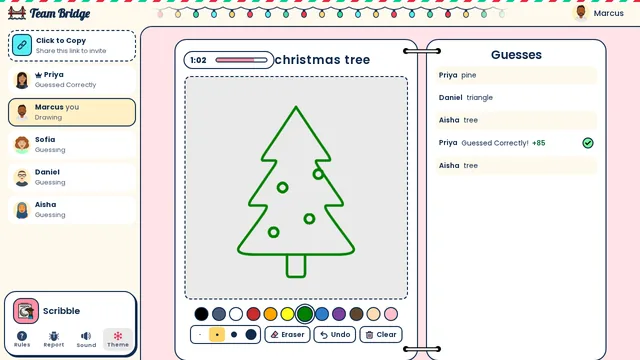
Scribble: Christmas words in Scribble: Marcus draws a Christmas tree while Priya has already guessed it 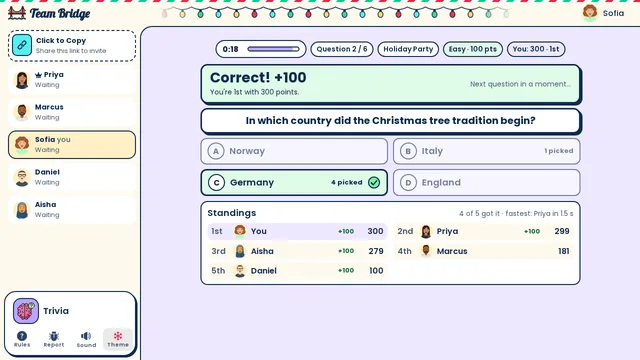
Trivia: Holiday Party trivia: 4 of 5 knew the Christmas tree tradition began in Germany, and Sofia leads the standings 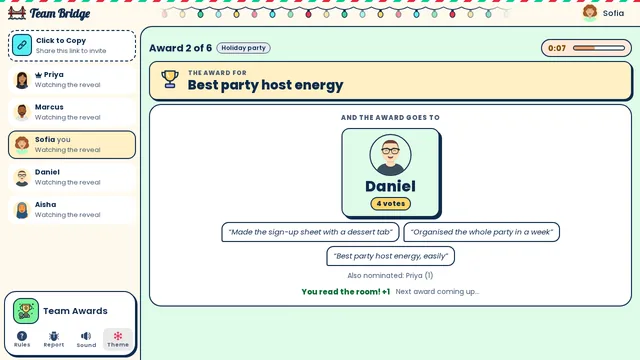
Team Awards: Holiday party awards: Daniel wins “Best party host energy” with 4 votes and three anonymous reasons


A 45-minute holiday party on Webex
One room for 6 to 50 people. On the free games only, swap Trivia and Team Awards for Fake Artist.
- 0–5 min
Join
Paste the room link in the Webex chat. People pick a name and an avatar.
- 5–18 min
Draw: Scribble
Pick Holiday (Christmas & winter) for the Christmas words; everyone guesses every drawing.
- 18–28 min
Quiz: Trivia
Ten questions from the Holiday (Christmas & winter) category, with a leaderboard after each one.
- 28–40 min
Awards: Team Awards
The Holiday (Christmas & winter) pack: everyone votes on the team’s superlatives, then gets an award card.
- 40–45 min
Close: Type Racer
One typing race for everyone.
Holiday party games for Webex

Scribble
FreeDraw-and-guess with the Holiday (Christmas & winter) words.
 3–100 players
 5–15 min

Trivia
PremiumA live quiz with a Holiday (Christmas & winter) category.
2–100 players5–10 min
Team Awards
PremiumHoliday party awards the team votes on.
3–50 players8–12 min
Fake Artist
FreeOne drawing, one faker.
4–200 players5–20 min
Type Racer
FreeA one-minute typing race.
2–200 players1–5 min
How to run it on Webex
1. Book a normal Webex meeting
Book it for 45 minutes. Nothing to add to Webex: no app, no add-on, no admin approval.
2. Open a room a few minutes early
Sign in on teambridge.app, pick the first game and copy the room link.
3. Paste the link in the Webex meeting chat
Everyone opens it in a browser tab next to Webex, on a laptop or a phone, and types a name. Guests don’t need an account.
4. Keep the call for talking
Everyone sees the game on their own screen, so nobody needs to share a screen. Share yours only for the final standings.
5. Start the next game from the same room
Everyone stays in the room between games, so you never send a second link.
What it costs
Nothing to install and nothing per person.
The free games
Nine games are free to play, including Scribble, Fake Artist, Spy Words, Two Truths, One Lie and Type Racer. You can start 5 free games for the group, whoever hosts, and 1 more 6 days after the last one. Each game you start uses one.
Team Event Pass: $199
Every game, the holiday packs included, for up to 200 players for 7 days. One payment for the whole party, not per person.
Only the host pays
Guests join from the link with a name, no account and no card. Buy it on the day of the party: the 7 days start when you pay.
Compared with a hosted party
Hosted virtual holiday parties with a live facilitator usually cost about $20 to $40 a person and are booked days ahead.
Webex questions
Webex apps and add-ons
Not needed: TeamBridge is a website. Webex is only the call and the chat.
Locked work laptops
Nothing installs. If the laptop blocks a new website, players can join on their phone from the same link.
More than 50 people
Fake Artist and Type Racer take up to 200 players and Trivia up to 100.
Questions
What games can we play at a work holiday party on Webex?
Browser games next to the call: Scribble with the Christmas words, a Holiday (Christmas & winter) Trivia quiz, Team Awards and a Type Racer race. Paste one TeamBridge link in the Webex meeting chat; nothing to add to Webex.
Is there a Webex app to install?
No. Everyone opens the link in a browser tab next to Webex, on a laptop or a phone.
Do we need to share a screen in Webex?
No. Everyone sees the game on their own screen; share yours only for the final standings.
Which games are free?
Scribble, Fake Artist and Type Racer are free; Trivia and Team Awards come with a pass.
Do guests need an account or a download?
No. The host signs in and shares the link; everyone else picks a name and plays in the browser, on a laptop or a phone.
How much does it cost?
The free games cost nothing: 5 free games for the group, whoever hosts, and 1 more 6 days after the last one. The $199 Team Event Pass adds every game for up to 200 players for 7 days, one payment for the whole party; only the host pays.
Games to play on Zoom with coworkersOnline games for coworkers, no downloadVirtual holiday party games
Ready for your next team social?
Share one link. Everyone plays in the browser.
Games to play on Microsoft TeamsOffice party gamesTeam building games for workIcebreaker games for meetingsA skribbl.io alternative for workA Gartic Phone alternative for workVirtual team triviaGames to play on Zoom with coworkersA Jackbox alternative for workPictionary on Microsoft TeamsA Kahoot alternative for team buildingFun Friday games for remote teamsA QuizBreaker alternative you play liveEnd of year team building gamesTeam building games for large groupsHoliday party games for large groupsIcebreakers for large groupsIcebreaker questions for workThis or that questions for workTeam building activities for workEmployee engagement ideasNew hire welcome gamesA virtual Family Feud-style game for workA Scattergories alternative for workA Mafia and Werewolf-style game for workA Connections-style game for work teamsA Name That Tune-style game for workA Wavelength-style game for workA Boggle-style word game for workA game like Among Us for workHoliday trivia for workChristmas Pictionary onlineHoliday icebreakers for workChristmas awards for workVirtual holiday bingo for workChristmas music quiz for workA Confetti alternative you host yourselfA Games for Work replacement for TeamsA Water Cooler Trivia alternative, played liveCompare team building options