 Team Bridge

How to play on Zoom, Microsoft Teams, Google Meet or in person
TeamBridge runs in a browser tab next to your call, so it works with any video call app. Share one link in the chat and everyone plays on their own screen while you keep talking. Nothing to add to the meeting and nothing to screen-share.
The same link works on laptops and phones, from home or the office.




Your first game, step by step
- Step 1
Start your call
Zoom, Teams, Meet or Webex: keep it open for voice and video.
- Step 2
Open a lobby
In a browser tab, pick a game on teambridge.app.
- Step 3
Paste the link
Copy the lobby link into the meeting chat. Everyone opens it and types a name.
- Step 4
Play
Everyone presses Ready and you start. The game explains the rules, runs the timer and keeps score.
What everyone sees on their own screen
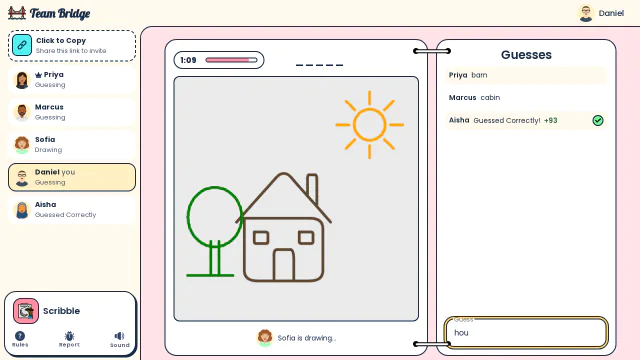
Scribble: Sofia draws a house with a tree and the sun: Aisha already got it, Daniel is typing his guess 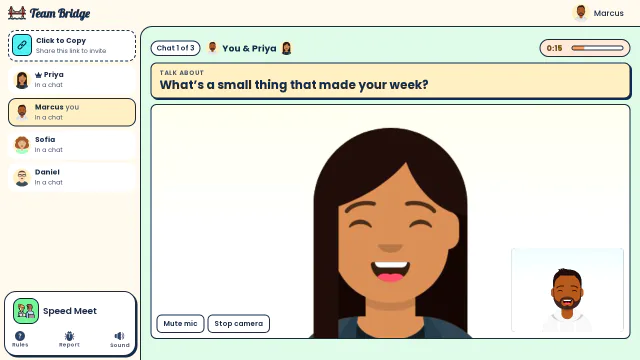
Speed Meet: Marcus and Priya in a one-minute video chat on “What’s a small thing that made your week?” with 15 seconds left (avatars stand in for webcams here) 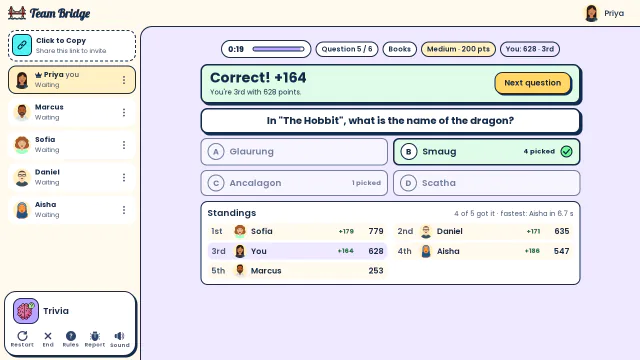
Trivia: The reveal for “In The Hobbit, what is the name of the dragon?”: four of five picked Smaug, and Sofia leads the standings


On each call
Zoom
Paste the lobby link in the Zoom chat. People open it in their browser and keep Zoom running for audio and video.
Microsoft Teams
Paste the link in the meeting chat, or use Share to Teams in the lobby to post it in a chat or channel. Nothing to add to Teams.
Google Meet
Paste the link in the Meet chat. Meet stays in one tab and the game in another; on a laptop, side by side works well.
Webex and others
Any call with a chat works the same way: the game only needs the link.
In person
Put a laptop on the TV or projector so the room can watch, and everyone plays on their phone from the same link. Remote colleagues join the same lobby.
Breakout rooms
Open one lobby per breakout room and paste each link in its room. Each lobby needs its own host; with a pass, invite your co-hosts to your team.
Questions
Do we have to share a screen?
No. Everyone sees the game in their own browser. A shared screen only helps in a room watching one TV.
Is there a Zoom or Teams app to install?
No. TeamBridge is a website: there is nothing to add to Zoom, Teams or Meet. Share the link in the meeting chat.
Can we use Zoom breakout rooms?
Yes. Open one lobby per room and paste each link in its room. Each lobby needs its own host.
Can people play on a phone during the call?
Yes. The link works in a phone browser. Many people stay on the call on their laptop and play on their phone.
Can people in the office and at home play together?
Yes. Everyone joins the same lobby link, wherever they are.
Games to play on Zoom with coworkersGames to play on Microsoft TeamsOffice party games
Still have a question?
Write to rob@teambridge.app or use the contact form. Or try a free game with your team first.
Free games and creditsDo players need an account?Player limits and big groupsEvent Pass, Year Pass or freePlay on Zoom, Teams, Meet or in personReceipts, invoices and POs